
up to 0
Chapters per pass. You decide how granular.
Auto Chapters generates YouTube-style chapter markers from speech inside Adobe Premiere Pro. Native MoGRT titles, fully editable font, color and animation, 99 languages. Free.
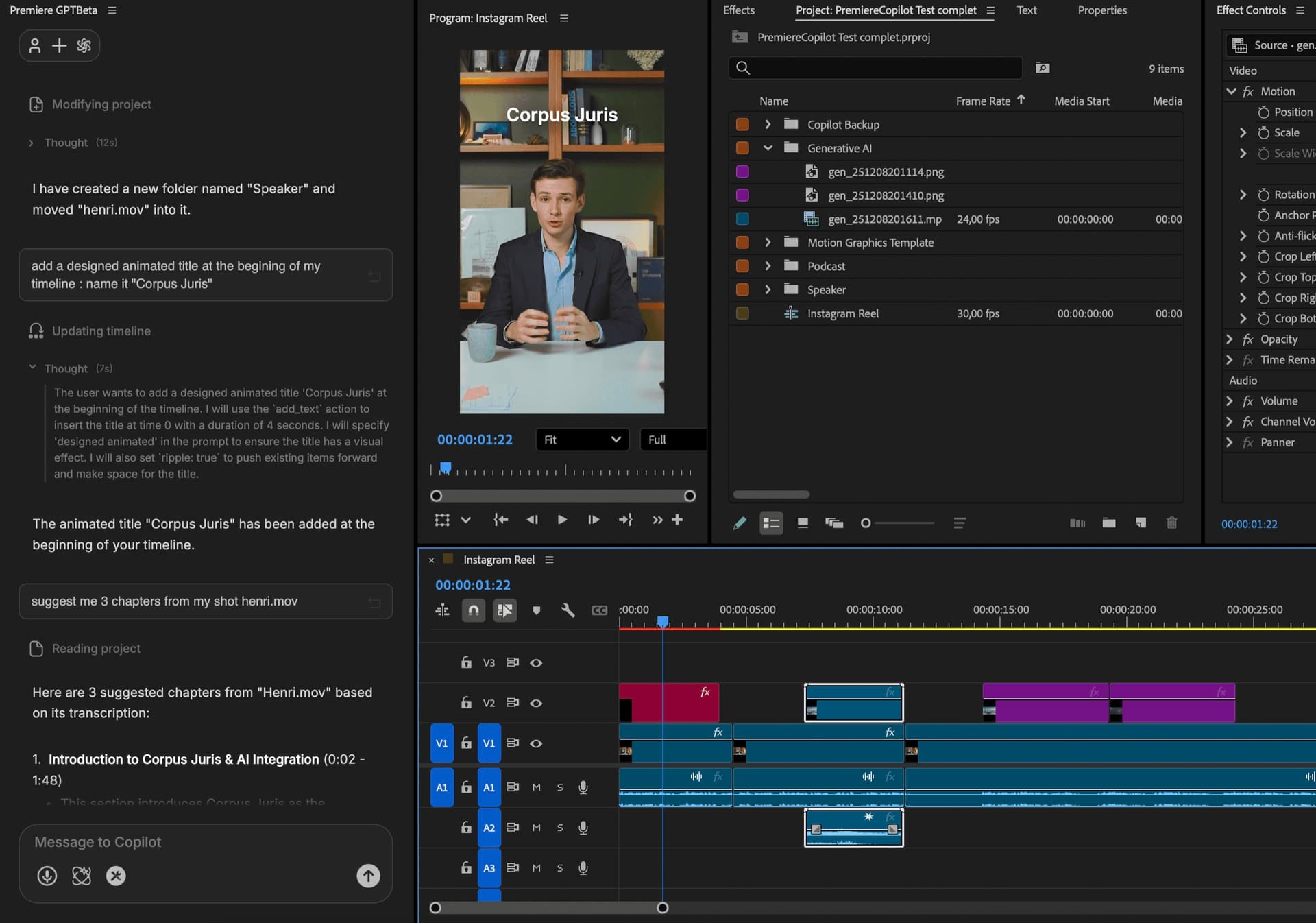
Tell PremiereCopilot how many chapters you want and what to focus on. It generates them as native Premiere markers + a copy-paste-ready YouTube description, formatted with timestamps. Free.
How it works
Prompt
Tell PremiereCopilot what the video is about and how many chapters you want (up to 40). Add a focus angle if you have one ('keep one chapter per topic shift', 'group setup steps together').
Analyze
Audio transcribed, topic shifts identified, chapter boundaries proposed. Review the proposal in the editor: rename, merge, drop, before generating.
Export
Chapters land as native Premiere markers — visible on your timeline, exported with the video. The same chapters are also formatted as a YouTube-ready description (timestamps + titles) and copied to your clipboard. Paste straight into the YouTube upload form.
What ships
Chapters per pass. You decide how granular.
Free with daily quota. Pro+ at $7.99/mo.
Native Premiere markers on your timeline. Visible, editable, exported with the video.
Timestamps + chapter titles auto-formatted and copied to your clipboard. Paste straight into the YouTube upload form, chapters auto-populate in the player.
Native Premiere markers. Edit, rename, drop.
Stack the rest
Plain-English prompts that edit your real timeline.
Learn moreMotion design generated from a single prompt.
Learn moreAny GenAI model, native in Premiere. By Fal.AI.
Learn moreWord-by-word, animated captions in 99 languages.
Learn moreActive speaker detection, multicam autocut.
Learn moreAuto-detect silences and tighten the edit.
Learn moreRemoves bad takes & repetitions, follows your script.
Learn moreTurn 1h of content into 10 vertical viral clips.
Learn more0 spelling mistakes. GPT-5 corrected, native subtitles.
Learn more1 audio → speaker-by-speaker tracks.
Learn moreEmotion-driven V2 zoom clips, generated.
Learn more
FAQ
Motion Graphics Template — a native Premiere format. Our chapters land as MoGRTs you can fully customize: change font, color, animation, position. Edit like any other title.
Yes. The output includes proper chapter markers in the right format for YouTube auto-detection. Export, upload, chapters auto-populate in the player.
AI analyzes the transcribed audio and identifies topic shifts. You can override any boundary or rename any chapter before export.
Yes. The MoGRTs are templated — change font, animation curve, colors, position. Save your custom design as a preset.
Type a prompt ('chapters for this tutorial about Premiere'), click generate, get chapters on the timeline. Usually under 2 minutes for a 30-min video.
Premiere Pro 2022 and later, on macOS (Intel + Apple Silicon) and Windows.